Pearson Edexcel · GCSE · Computer Science
Course version: 1CP2 · Version from Sept 2020
Understand how standard algorithms (bubble sort, merge sort, linear…
Full specification wording
Algorithms: 1.2.6 understand how standard algorithms (bubble sort, merge sort, linear search, binary search) work
Four standard algorithms must be understood.
Checked against the Pearson Edexcel 1CP2 specification (opens in a new tab) on .
- Point 4 of 4
- 4 key terms
Study notes
From the checked teaching notes for this specification point.
The idea
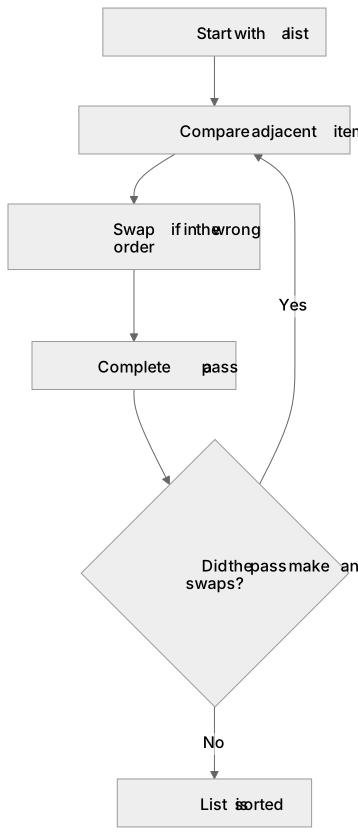
Four standard algorithms must be understood. Bubble sort repeatedly compares adjacent items in a list and swaps them when they are in the wrong order, so large values move to the end on each pass; passes repeat until a complete pass makes no swaps. Merge sort splits a list into single-item sublists, then repeatedly merges pairs of sorted sublists in order until one sorted list remains. Linear search checks each item from the start of a list in turn until the target is found or the list ends, so it works on unsorted data. Binary search requires a sorted list: it examines the middle item, then discards the half that cannot contain the target and repeats on the remaining half until the target is found or the search space is empty.
What earns the marks
- Bubble sort compares adjacent pairs and swaps them when out of order, repeating passes until a pass produces no swaps.
- Merge sort divides the list into single items, then merges sorted sublists pairwise in order until a single sorted list remains.
- Linear search examines items one at a time from the start until the target is found or the list is exhausted, and does not require sorted data.
- Binary search requires a sorted list, tests the middle item, then discards the half that cannot contain the target and repeats on the remaining half.
- Efficiency comparison: binary search is generally faster than linear search on large sorted lists, while linear search is the only option for unsorted data.
- Correct application: for a given list and target, state the items examined in order and the final result for each algorithm.
Common mistakes and how to put them right
Using binary search on an unsorted list.
Put it right: Binary search depends on sorted order, so the list must be sorted first or linear search used instead.
Stopping bubble sort after one pass.
Put it right: Passes continue until a complete pass makes no swaps, because one pass may not fully sort the list.
Merging sublists in merge sort without comparing their items.
Put it right: Merging must place items in order, comparing the front items of the sublists at each step.
Skipping items in a linear search.
Put it right: Linear search checks each item in turn from the start until the target is found or the list ends.
Exam tips
- For a given list, write out the state of the list after each pass or merge so the examiner can follow your working.
- State clearly whether a list must be sorted before an algorithm can be used, and name the algorithm that works on unsorted data.
- When comparing search algorithms, refer to the number of items examined rather than vague claims about speed.
Try the lesson
The start of the Algorithms: 1.2.6 understand how standard algorithms (bubble sort, merge sort, linear search, binary search) work lesson, made from checked teaching notes for this specification point.
Have a go first
A linear search is carried out on the list 7, 2, 9, 4, 6 to find the value 4. The search starts at the first item and compares each item in turn with 4 until the value is found. How many comparisons are made before the search stops?
Listen
Four standard algorithms must be understood. Bubble sort repeatedly compares adjacent items in a list and swaps them when they are in the wrong order, so large values move to the end on each pass; passes repeat until a complete pass makes no swaps. Merge sort splits a list into single-item sublists, then repeatedly merges pairs of sorted sublists in order until one sorted list remains. Linear search checks each item from the start of a list in turn until the target is found or the list ends, so it works on unsorted data. Binary search requires a sorted list: it examines the middle item, then discards the half that cannot contain the target and repeats on the remaining half until the target is found or the search space is empty. A strong answer earns marks for these points. Bubble sort compares adjacent pairs and swaps them when out of order, repeating passes until a pass produces no swaps. Merge sort divides the list into single items, then merges sorted sublists pairwise in order until a single sorted list remains. Linear search examines items one at a time from the start until the target is found or the list is exhausted, and does not require sorted data. Binary search requires a sorted list, tests the middle item, then discards the half that cannot contain the target and repeats on the remaining half. A common slip: Using binary search on an unsorted list. Instead, binary search depends on sorted order, so the list must be sorted first or linear search used instead. Exam tip: For a given list, write out the state of the list after each pass or merge so the examiner can follow your working.
See it
Key words
Say what each word means before you turn the card.
Bubble sort
Try answering aloud or in your head before turning the card.
Merge sort
Try answering aloud or in your head before turning the card.
Linear search
Try answering aloud or in your head before turning the card.
Binary search
Try answering aloud or in your head before turning the card.
See every definition
- Bubble sort
- Repeatedly compares adjacent items in a list and swaps them when they are in the wrong order, so large values move to the end on each pass.
- Merge sort
- Splits a list into single-item sublists, then repeatedly merges pairs of sorted sublists in order until one sorted list remains.
- Linear search
- Checks each item from the start of a list in turn until the target is found or the list ends, so it works on unsorted data.
- Binary search
- Requires a sorted list: examines the middle item, then discards the half that cannot contain the target and repeats on the remaining half.
Label the diagram
Some boxes have lost their names. Pick the right name for each number.
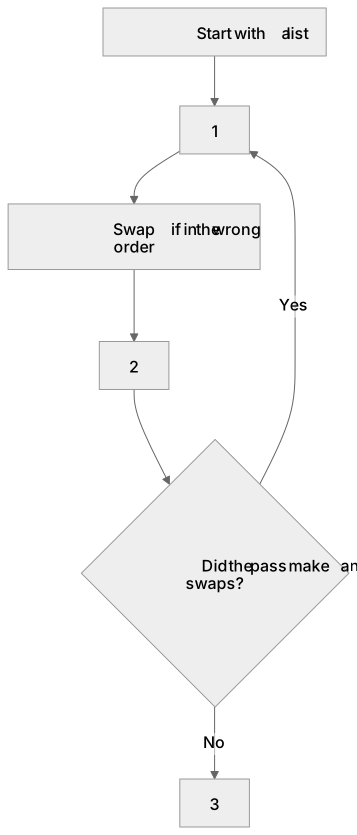
1Box 1
2Box 2
3Box 3
There is more to this lesson
The full lesson goes on to check your understanding and help you earn the marks. Create a free account to carry on, with your progress saved.
A week of Premium from your first lesson · Then the free plan continues · No card, no charge
Test your understanding of Algorithms: 1.2.6 understand how standard algorithms (bubble sort, merge sort, linear search, binary search) work
Active recall beats re-reading. Take an instant quiz now to test what you’ve learned and lock it into long-term memory.
A week of Premium from your first lesson · Then the free plan continues · No card, no charge